Update account settings
Change your name, default units (feet or meters), dark mode or light mode, and password from the Account window.
In Event Design App, you update account settings from the Account window in the account menu. There you can change your display name, choose Imperial or Metric default units for new plans (feet or meters), switch between Dark and Light appearance, and change your password. Units apply to new plans (layouts) only, and your sign-in email cannot be edited. These settings apply to every account type.
Your plans open in feet when your venue is measured in meters, or the screen is too bright for a late-night session. Both are account settings, and they are quick to change. This article covers every setting in the Account window and the one thing that surprises people: units do not change plans you have already made.
How to open the Account window
To open the Account window:
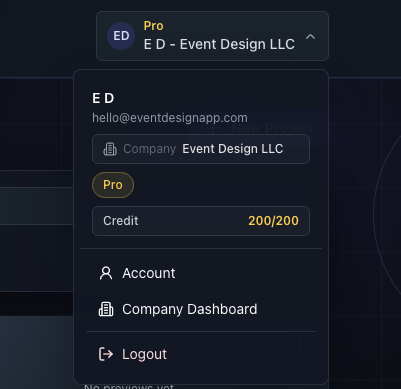
Select the account menu in the top right.
Choose Account.
The window has two sections, Profile and Change password, each with its own button. Saving one does not save the other.

What can I change in my profile?
The Profile section of the Account window holds your display name, email, default units and appearance.
Display name
This is the name shown on your account (and to teammates on company accounts). It must be at least 2 characters.
Your email is shown but cannot be edited here.
⚠ You cannot change your sign-in email in this window. The field is read-only. Contact support if you need it changed.
Default units for new plans
Choose Imperial (feet) or Metric (meters).
⚠ This only affects new plans. Existing saved plans are not bulk changed. The editor you currently have open updates immediately, but a plan you create next week starts in your saved default.
💡 Set this before your first plan. If your venue gives dimensions in meters and you work in feet, choose the one you will type most often. See Getting started — where to find everything.
Appearance
Choose Dark or Light.
Save profile
Choose Save profile. The button stays disabled until you change something. On success you see Account settings saved. Display name, units and appearance all save together.

How to change your password
To change your password, use the Change password section of the Account window.
Enter your Current password.
Enter a New password of at least 8 characters.
Enter it again under Confirm new password.
Choose Update password.
You will see Password updated. The three fields clear afterward.
⚠ You need your current password. If you have forgotten it, sign out and use Forgot password? on the Login page. See Verify your email or reset your password.
What else is in the account menu?
Account settings are separate from billing and company settings:
Subscription shows your plan and credits. It appears for individual accounts.
Company Dashboard replaces it for company admins (company accounts only).
Convert to Company turns an individual account into a company account.
Logout signs you out.
Troubleshooting
Save profile is greyed out. You have not changed anything yet.
"Display name must be at least 2 characters." Make the name longer. Spaces on either end are trimmed.
"Enter your current password." The current-password field is empty.
"New password must be at least 8 characters." Use a longer password.
"New passwords do not match." The new password and confirmation differ. Retype both.
My old plans are still in feet after switching to Metric. Expected. Only new plans use the new default.
I changed units but nothing happened in my open plan. Make sure you chose Save profile. The open editor updates only after saving.
I do not see Subscription. Company members do not get it; company admins see Company Dashboard instead.
Frequently asked questions
Why didn't my existing plans switch to Metric after I changed units?
Default units apply to new plans (layouts) only. Existing saved plans are not bulk changed, so they stay in their original units. The editor you currently have open updates after you choose Save profile, and any plan you create afterward starts in your saved default of Imperial (feet) or Metric (meters).
Can I change my sign-in email?
Not from the Account window. Your email is shown there but the field is read-only, so you cannot change your sign-in email (login email) yourself. Your display name, default units and appearance can still be edited in the Profile section, but the email stays fixed. Contact support if you need it changed.
Why is Save profile greyed out?
Save profile stays disabled until you change something in the Profile section, such as your display name, default units or appearance. Make a change and the button becomes available. One click saves display name, units and appearance together, and you see Account settings saved. Saving the profile does not save a password change.
How do I change my password if I know my current one?
Open Account from the account menu, then use the Change password section. Enter your Current password, a New password of at least 8 characters, and the same value under Confirm new password, then choose Update password. You see Password updated. If you forgot your current password, use Forgot password? on the Login page instead.
Why can't I see Subscription in my account menu?
Subscription appears for individual accounts only. Company members do not get it, and company admins see Company Dashboard instead, where billing is handled. If you belong to a company and need a different plan, ask your company owner or administrator.